

Your laptop.
Two cameras.
No rebuilding.
No proprietary scanner. The Idiag C360 runs on a Windows laptop and standard 3D cameras, the Orbbec Astra 2, which you buy yourself. We supply the software, the license and the onboarding.
What goes on your list
Orbbec Astra 2 3D camera
A standard 3D depth camera from Orbbec, $353 each in the official Orbbec store (October 2026, plus tax and shipping), with a USB-C cable included. We recommend two (rear and overhead); one works too. It records only the surface shape of the back.
Buy the Astra 2 at OrbbecPlease order exactly the Astra 2. Other Orbbec models are not supported.
Stands or mounts
One per camera, with a standard 1/4-inch camera screw. The rear camera sits on a sturdy tripod at about mid-back height. The overhead camera looks down at the bent back, so it needs a tripod with a head that tilts by at least 45°, a boom arm, or a wall or ceiling mount.
The stand must not wobble: the software levels every scan with the camera's own gravity sensor, but a moving camera blurs the result.
A Windows laptop or PC
Windows 10 or 11, 8 GB RAM, Full HD screen and a free USB 3 port for each camera. The camera comes with a USB-C cable; for a USB-A port use a USB 3 adapter. The one at your front desk will do.
Software and license
The Idiag software with the camera module, the license key and the download link by email. Includes the guided capture, reports and the training planner.
Order a licenseTwo cameras recommended. One works too.
Both setups measure the same way and give the same results. With two cameras nothing has to be rebuilt between postures, which is why we recommend it.
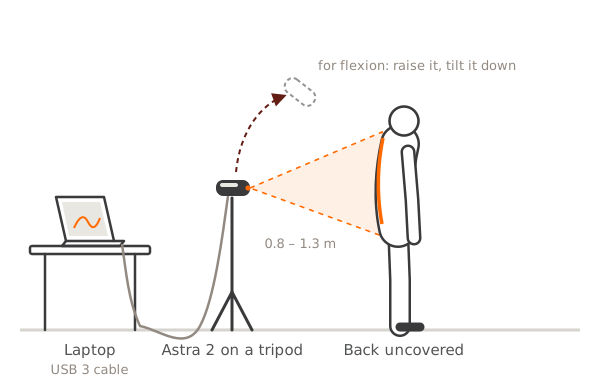
One camera
- One Astra 2 on one stand, behind the person.
- Standing postures are measured from behind, 0.8 to 1.3 m (about 3 to 4 ft) away.
- For forward bending and four-point kneeling the software asks you to move or tilt the camera above the back and shows a tilt check until it is right.
- Lowest cost, fine for a few checks a day.
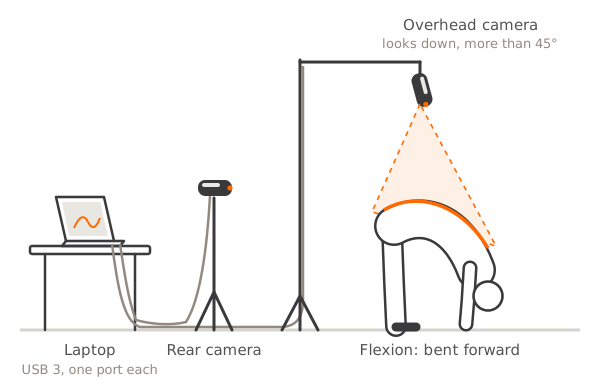
Two cameras
- A rear camera behind the person for the standing postures.
- An overhead camera that looks down at the bent back (tilted more than 45°), for forward bending and kneeling. It sits roughly 0.4 to 1.1 m above the back.
- The software recognises which camera is which by their gravity sensors. Nothing to configure, and no camera has to be moved between postures.
- Each camera on its own USB 3 port directly on the computer, no hub: two 3D cameras on one port share too little bandwidth.
- Faster checks, no handling errors from moving the camera; the right setup for a Back Week.
If the second camera is unplugged, the software simply continues with one camera and tells you when to move it. A second workstation (laptop, camera and stand) doubles the number of checks per hour, for example for a Back Week with more than 40 checks a day.
A private corner, normal light
- The back is measured uncovered (women can keep a regular bra on), so use a privacy screen or a small room.
- A plain wall behind the person, about 2 m (7 ft) of free space between camera and wall.
- Normal room light. Avoid direct sunlight and bright spotlights on the person: strong infrared light disturbs the depth camera.
- Floor space for bending forward and for kneeling on a mat.
In this order
Order the license
You receive the invoice, the download link and your license key by email.
Order cameras and stands
Two Orbbec Astra 2 (or one) from the Orbbec store, and a stand or mount for each.
Install and connect
Install the software from the link, enter the key, plug the camera into a USB 3 port.
Test measurement
Measure a colleague. The on-screen checks show distance, framing and tilt in green when everything is right.
Questions about the setup?
Book a 20-minute online demo. We show you the setup and run a check on you.